The most common mistake: copy-pasting without understanding
When someone starts coding with AI help, the temptation is to ask for the full code, paste it in, and move on. The problem is you don't actually learn anything that way — you just end up with a file that works until something breaks, and at that point you won't even know where to start fixing it.
The difference between using AI to learn and using it to do the task for you comes down to how you ask. "Build me a login form in React" gets you code. Asking it to walk you through each part, and check that you understood before moving on, gets you real learning.
Five practical ways to use AI as a tutor
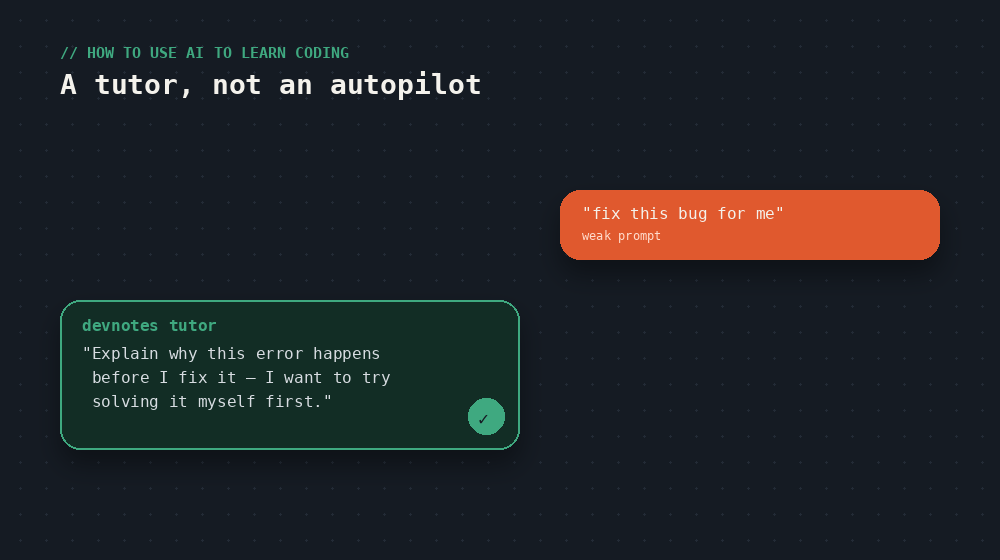
- Ask for explanations, not just solutions. Instead of "fix this bug," try "explain why this code throws this error, but don't fix it yet — I want to try fixing it myself first."
- Use AI to generate exercises at your level. Ask for 3 small exercises on a concept you just learned (loops in JavaScript, for example), then have it review your attempts.
- Ask for real-world analogies. Abstract concepts like "asynchronicity" or "recursion" click much faster with an everyday comparison than with the textbook definition.
- Simulate a coding interview. Ask it to quiz you on a topic like a junior technical interview, and give you honest feedback on your answers.
- Get your own code reviewed. This is more valuable than asking for new code: write something first, even if it's wrong, and ask for a review with improvement suggestions.
A prompt that actually works
How you phrase a request completely changes the quality of what you get back. Compare these two approaches:
The second prompt turns AI into a tutor instead of a copy-paste machine. It takes a little longer to type, but the result is knowledge that actually sticks.
Build real projects, not just isolated exercises
Small exercises teach syntax, but full projects teach you to think like a developer: how to organize files, how to break a big problem into small pieces, and how to debug when something isn't working and you don't know why. Use AI as a companion throughout the whole project, not just at the start — ask it to help plan the structure before writing a single line, and consult it when you get stuck, not after you've already lost an hour frustrated.
What AI shouldn't replace
As useful as it is, there are two things no AI does for you: repeated practice (writing code with your own hands, many times) and the time it takes to sit and think through a problem before asking for help. If you ask AI the second you're stuck, you never build the frustration tolerance every programmer needs. A good rule: try it yourself for 10-15 minutes before asking.
Reading about it is step one. The devnotes courses are where you actually build it — hands-on, one short lesson at a time.